 Skip to Content

Electronic Logging Device Explained for Drivers and Fleets
An electronic logging device (ELD) synchronizes directly with a commercial vehicle’s engine to automatically record hours-of-service (HOS) data, replacing paper logs with tamper-resistant digital records. The mandate was adopted under MAP-21 to improve the accuracy of Records of Duty Status (RODS) and reduce fatigued driving on U.S. highways. If you drive a commercial motor vehicle (CMV) in interstate commerce and are required to keep RODS, this rule almost certainly applies to you.
Every compliant ELD captures:
- Driving time and duty status changes
- Engine hours, vehicle miles, and engine power status
- Vehicle motion status and location at duty status changes
- Driver and vehicle identifiers (VIN, driver ID, carrier info)
Pro Tip: Keep a printed copy of your most recent 24-hour log and the previous seven days in the cab at all times. Officers can request them at any roadside inspection, and a missing printout is one of the fastest ways to earn a citation. In addition, FMCSA requires drivers to carry at least 8 days of blank paper graph-grids as backup in case of ELD malfunction.
Table of Contents
- What is an electronic logging device in practical terms?
- How ELDs record driving events and duty status
- Who needs an ELD under the U.S. mandate?
- What are the key FMCSA compliance requirements?
- Daily responsibilities for drivers and carriers
- How do ELDs differ from AOBRDs and paper logs?
- What does ELD installation cost and how does it work?
- What happens at a roadside inspection?
- How is ELD data used in crash investigations and litigation?
- Key Takeaways
- ELD evidence and what it means for your case
- Serious about a truck crash claim? Calillaw can help.
- Useful sources
What is an electronic logging device in practical terms?
An ELD is not simply a GPS tracker or a fleet telematics unit. It is a purpose-built device that connects to the vehicle’s engine control module (ECM) using diagnostic protocols such as J1939, J1708, or OBD-II. That engine connection is what separates an ELD from a standalone GPS: the device reads real engine telemetry, not just satellite position.
The system has three distinct parts. The hardware unit plugs into the diagnostic port and reads engine data. The driver display or interface (often a tablet app or dedicated screen) shows the driver their current duty status and log graph. Supporting telematics software on the carrier’s back end stores and transmits records. Portable ELDs are permitted, but FMCSA requires them to be mounted in a fixed position and visible to the driver while operating the CMV.
Under FMCSA’s technical standards, a compliant device must capture engine power status, vehicle motion status, miles driven, engine hours, date and time, geographic location, driver and co-driver identification, and the carrier’s USDOT number. A GPS-only device that cannot read engine data does not meet that standard, regardless of how it is marketed.
How ELDs record driving events and duty status
The recording process is largely automatic, which is exactly the point. When the vehicle exceeds 5 miles per hour and remains in motion for 60 consecutive seconds, the ELD automatically switches the driver’s duty status to “Driving.” The driver cannot override that switch manually while the vehicle is moving.
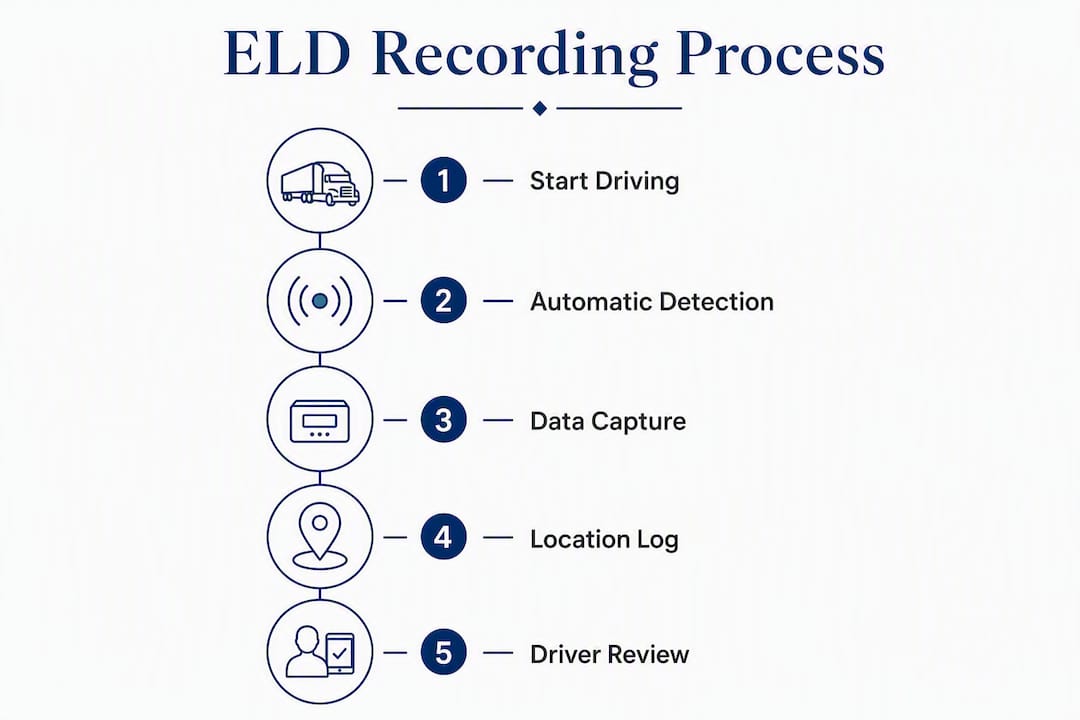
Location is captured at every duty status change and at regular intervals during driving. The timestamp and coordinates are locked to that event and cannot be deleted, only annotated. That audit trail is what makes ELD data probative in investigations: the device records original entries, edits, and annotations so every change is visible, and the original entry is never erased.

When a carrier believes a non-driving entry needs correction, they may suggest an edit. The driver must then review, accept or reject the suggestion, and certify the RODS. Drivers retain final authority over their own logs.
Pro Tip: Resolve exception flags the same day they appear. Unresolved exceptions at a roadside inspection signal to officers that records may be inaccurate, and they can trigger a deeper review of your entire log history.
Who needs an ELD under the U.S. mandate?
The rule covers drivers who are required to keep RODS under 49 CFR Part 395. That includes most drivers of CMVs operating in interstate commerce, covering both large trucks and buses. If you currently use paper logs, you almost certainly need an ELD.
Common exemptions include:
- Pre-2000 vehicles: — CMVs with engines manufactured before the year 2000 are exempt because older ECMs lack the diagnostic ports ELDs require.
Carriers may voluntarily adopt ELDs even when not required. Many do so for the operational benefits: automated log management, reduced paperwork disputes, and cleaner records during audits.
What are the key FMCSA compliance requirements?
Device registration and self-certification
Manufacturers must self-certify that their ELD meets FMCSA’s technical standards and register the device on the agency’s public list. Carriers bear responsibility for verifying that any device they deploy actually appears on that list. Using an unregistered device is a violation, even if the hardware looks identical to a compliant one.
Data transfer, record retention, and harassment protections
At a roadside inspection, officers may request ELD data via on-screen display, printout, or electronic transfer. FMCSA authorizes two transfer methods: telematics or web services (including email), and local transfer via Bluetooth, USB, or thumb drive. Carriers must retain ELD RODS and backup data for six months and keep a backup copy on a separate device.
The ELD rule explicitly prohibits carriers from using ELD data to harass drivers. Drivers who believe they are being coerced or harassed based on their ELD records have formal recourse through FMCSA’s complaint process.
| Requirement | What it means | Where to verify |
|---|---|---|
| Device registration | ELD must appear on FMCSA’s registered list | FMCSA ELD device list |
| Data transfer | Must support telematics/web services or local transfer (Bluetooth/USB) | FMCSA data transfer guidance |
| Record retention | Carriers retain RODS and backups on a separate device | FMCSA Fact Sheet |
| In-cab packet | User manual, transfer instructions, malfunction procedures, 8 days of paper graph-grids | FMCSA Fact Sheet |
Daily responsibilities for drivers and carriers
Compliance is not a one-time setup. It requires consistent daily habits from both drivers and carriers.
Driver responsibilities:
- Log in with your personal driver ID at the start of every shift
- Review and certify your RODS at the end of each day
- Add annotations for any exceptions or unresolved flags before certifying
- Carry the full ELD in-cab packet: user manual, data transfer instructions, malfunction procedures, and at least 8 days of blank paper graph-grids
- Know how to initiate a data transfer if an officer requests it
Carrier responsibilities:
- Deploy only devices that appear on FMCSA’s registered list
- Retain all RODS and backup data for a minimum of six months
- Protect driver privacy and never use ELD data as a harassment tool
- Manage suggested edits through proper channels and document dispute resolutions
In-cab inspection checklist:
- ELD user manual (physical copy or accessible on device)
- Data transfer instructions
- Malfunction and diagnostic procedures
- Eight days of blank paper graph-grids
- Current certified RODS for the past 7 days
How do ELDs differ from AOBRDs and paper logs?
An Automatic On-Board Recording Device (AOBRD) was the predecessor to the ELD. Both devices recorded HOS data electronically, but the similarities end there.
Key differences:
- Data standards: — ELDs must meet FMCSA’s strict technical specifications under 49 CFR Part 395, Appendix A. AOBRDs operated under a less rigorous standard that allowed more variation in how data was captured and displayed.
- Tamper-resistance: — An ELD’s direct ECM connection means driving events are recorded from engine telemetry, not driver input. AOBRDs allowed more manual entry, which created more opportunity for inaccuracy.
Operationally, the shift from paper or AOBRD to ELD means drivers lose the ability to manually adjust driving time after the fact. That adjustment requires a formal annotation and carrier review, which is a significant workflow change for drivers accustomed to paper flexibility.
What does ELD installation cost and how does it work?
Costs vary based on hardware type, vehicle count, and the software platform the carrier selects. Plug-and-play units that connect directly to the OBD-II port are the simplest to install and generally carry lower upfront costs. Hardwired units require a professional installer, which adds labor cost but typically provides a more stable connection.
Ongoing expenses include monthly telematics or data plan fees, which vary by provider and feature set. Fleets with additional needs such as dispatch integration, IFTA reporting, or camera systems will pay more than a single owner-operator running a basic ELD.

Before purchasing any device, confirm it appears on FMCSA’s registered list. Verify that the vendor provides all required documentation: the user manual, data transfer instructions, and malfunction procedures. Some vendors ship devices without complete paperwork, which puts the carrier in violation before the first mile is driven.
Pro Tip: Stage your ELD rollout by starting with a small group of drivers, resolving exception patterns and training gaps before fleet-wide deployment. Drivers who understand annotation workflows before their first roadside inspection generate far fewer compliance issues.
What happens at a roadside inspection?
Safety officers can request ELD data in three ways: on-screen display, a printout, or electronic transfer via the device’s supported method. Drivers should know which transfer method their ELD supports before they ever face an inspection.
Common violations that trigger citations or out-of-service orders:
- Missing any item from the required in-cab ELD packet
- Unresolved exception flags on the current or recent logs
- Using a device not on FMCSA’s registered list
- Falsified or manually altered log entries
- Failure to certify RODS within the required timeframe
If you receive a citation at inspection, document everything: the officer’s name, badge number, the specific violation cited, and the condition of your ELD at the time. Do not attempt to alter logs after the fact. If you believe the citation was issued in error, the formal dispute process runs through FMCSA and your carrier’s safety department.
How is ELD data used in crash investigations and litigation?
ELD records are among the most valuable pieces of evidence in a commercial truck crash case. The audit trail shows not just where the driver was and how long they had been driving, but also every edit and annotation made to the log, with timestamps. That transparency cuts both ways: it can establish a driver was within legal HOS limits, or it can reveal that a carrier pressured a driver to keep moving past safe limits.
Attorneys and claim handlers typically look for:
- Driving hours leading up to the crash to assess fatigue as a contributing factor
- Location timestamps to reconstruct the sequence of events
- Edit history to identify whether records were altered after the incident
- Carrier annotations that may show operational pressure on the driver
For wrongful death and catastrophic injury claims involving CMVs, ELD data can be the difference between a defensible case and an indefensible one. Preservation is urgent: carriers are only required to retain records for six months, and data can be overwritten or lost if no one acts quickly.
Pro Tip: After any serious crash involving a CMV, send a written preservation demand to the carrier immediately. Request all ELD exports, backup files, driver annotations, and any carrier-suggested edits from the 30 days preceding the crash. Waiting even a few weeks can mean critical data is gone.
Attorneys advise securing ELD exports and requesting carrier preservation letters as early as possible, and reviewing any ELD-related carrier policies that may explain exceptions or edits in the record.
Key Takeaways
ELDs are federally mandated safety tools that automatically record HOS data through direct engine synchronization, and compliance requires verified device registration, complete in-cab documentation, and timely RODS certification.
| Point | Details |
|---|---|
| Verify FMCSA registration | Always confirm your ELD appears on FMCSA’s registered device list before deployment. |
| Carry the full in-cab packet | User manual, transfer instructions, malfunction procedures, and at least 8 days of blank paper graph-grids are required at every inspection. |
| Certify RODS promptly | Annotate and certify your records daily; unresolved exceptions are a top roadside violation trigger. |
| Preserve ELD data after a crash | Carriers retain records for a minimum period; send a preservation demand immediately after any serious incident. |
| Calillaw for ELD crash cases | If ELD evidence is central to your claim, Calillaw’s trial attorneys can help you secure and use that data effectively. |
ELD evidence and what it means for your case
ELD data has changed how truck accident cases are built and argued. The records do not lie about when a driver was moving, how long they had been on the road, or whether a carrier edited the logs after a crash. That is not a theoretical advantage. It is a concrete evidentiary tool that experienced trial attorneys know how to use.
What concerns me most, from a litigation standpoint, is how often critical ELD data is lost simply because no one acted fast enough. Carriers are not required to hold records beyond six months, and without a formal preservation demand, that data disappears. By the time a family retains counsel and the attorney sends a letter, the window may already be closing.
The other underappreciated issue is the edit history. Most people focus on the driving hours, but the annotation trail, who suggested what change and when, can reveal carrier pressure on a driver far more clearly than the raw log. That is the kind of evidence that changes settlement negotiations and, when necessary, changes verdicts.
If you are researching truck accident compensation or trying to understand what ELD records mean for your situation, the time to act is now, not after the six-month clock runs out.
Serious about a truck crash claim? Calillaw can help.
When a commercial truck crash turns your life upside down, the evidence that matters most is often sitting on a carrier’s server with a countdown clock on it. Calillaw represents injured individuals and families in Florida on a contingency fee basis, meaning you pay nothing unless we recover for you.
Our trial attorneys handle truck accident claims, catastrophic injury cases, wrongful death, and insurance disputes where ELD data is central to proving what happened. We know how to request, preserve, and use electronic logging records before carriers have any reason to let them expire. If you or someone you love was seriously hurt in a CMV crash, contact Calillaw for a free consultation. The sooner you call, the more evidence we can protect.
This article is general information, not legal advice. For guidance specific to your situation, consult a qualified attorney or review the applicable FMCSA regulations directly.
Useful sources
These are the most authoritative resources for ELD rules, device verification, and compliance guidance:
- Electronic Logging Devices overview | FMCSA — Start here for the official rule summary, phased implementation history, and links to the registered device list.
- ELD registered device list | FMCSA — Verify any ELD before purchasing or deploying it; using an unregistered device is a violation regardless of vendor claims.
- ELD Fact Sheet | FMCSA — Plain-language summary of in-cab requirements, record retention rules, and malfunction procedures.
- ELD data transfer guidance | FMCSA — Explains authorized transfer methods for roadside inspections.
- ELD harassment protection | FMCSA — Outlines driver rights and recourse when ELD data is used coercively.
- ELD carrier and driver training | FMCSA — Free official training covering device use, driver responsibilities, and inspection procedures.
- 49 CFR Appendix A, Subpart B of Part 395 | Cornell LII — The full technical specifications every compliant ELD must meet.


